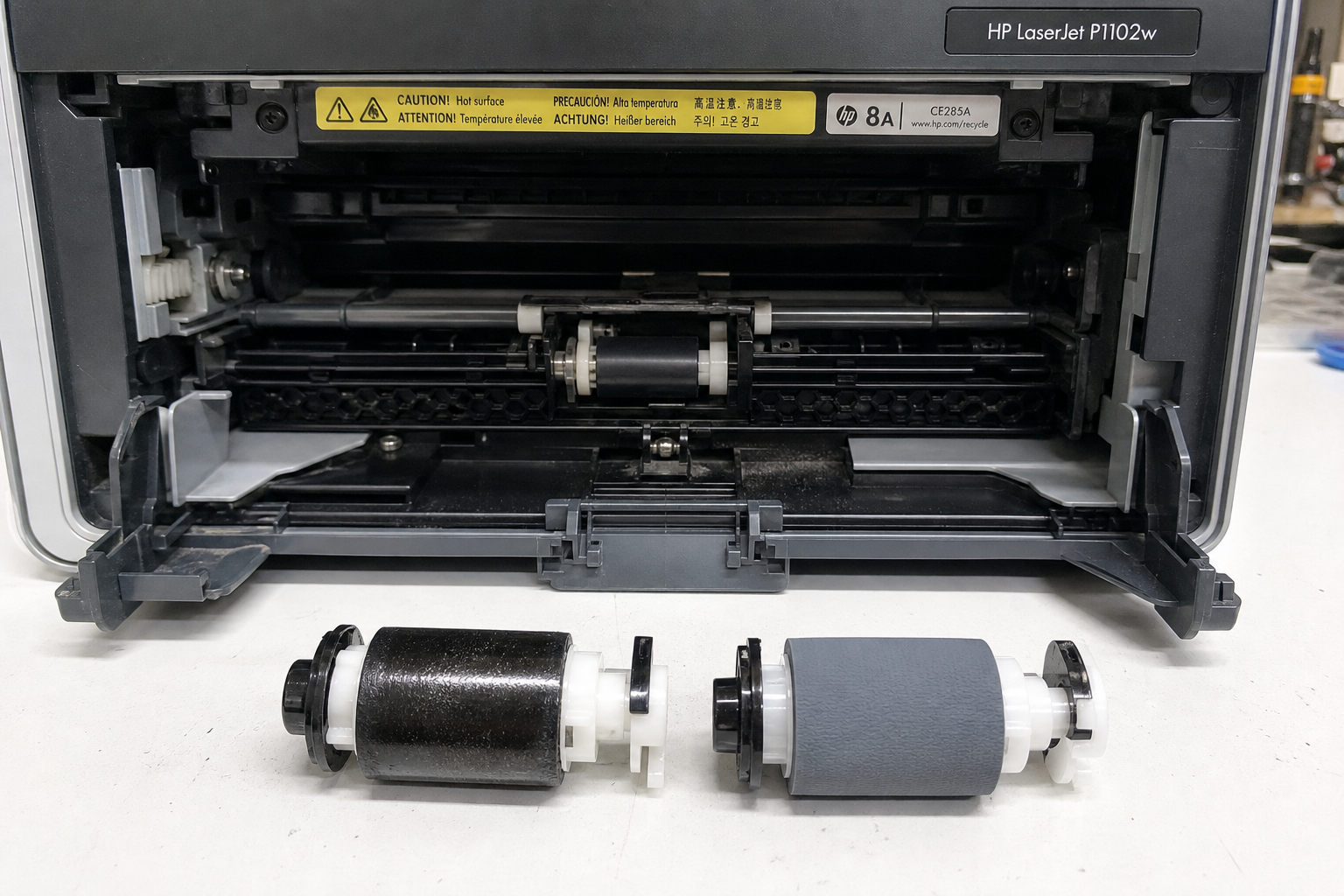
If your HP LaserJet P1102w is jamming, refusing to pick up paper, or showing error codes like E0 or 13.1 Paper Jam, the pickup roller is likely worn or glazed. This guide provides step-by-step diagnosis, root cause analysis, and a clear DIY repair process using the genuine RL1-2593-000CN roller.
What’s Happening — Symptoms in Detail
Your HP LaserJet P1102w suddenly stopped feeding paper. You press print, hear the motor whir, but no paper enters — or it jerks in and stops. The printer may display E0 (paper jam) even though nothing is stuck, or 13.1 Paper Jam with a blank sheet halfway. Some users report a scraping or clicking sound as the roller spins without gripping. Others experience multiple feed errors where several sheets get pulled at once. The problem often starts intermittently: it works for a few prints, then fails. It gets steadily worse until every job fails. Some users notice the roller looks shiny or smooth instead of having a dull rubber finish. The issue is nearly always the pickup roller — not the separation pad or solenoid.
How to Diagnose the Problem Step by Step
Quick Visual Check — Open the top cover and look at the gray rubber pickup roller on the right side. Normal: matte, slightly rough texture. Abnormal: shiny, smooth, or cracked surface.
Manual Rotation Test — Turn the large gear behind the roller by hand. Normal: the roller rotates with slight resistance. Abnormal: it spins freely or feels gritty. This tells you if the roller is slipping on its shaft.
Paper Feed Test with a Single Sheet — Insert one sheet of standard 20lb paper. Press the button to feed. Watch the roller. Normal: it grabs the paper and pulls it in smoothly. Abnormal: the roller spins but paper doesn’t move, or paper stalls after entering.
Error Code Check — From the printer’s control panel, look for E0 or 13.1. These codes often mean the paper sensor detected no pickup within a set time. This confirms the roller isn’t feeding.
Separation Pad Check — While you’re at it, inspect the small rubber pad opposite the roller. Normal: it’s flat and slightly tacky. Abnormal: it’s worn down or has a groove. This contributes to multiple feeds but is not the primary cause here.
Why This Happens — Root Cause
The pickup roller on the HP LaserJet P1102w (part RL1-2593-000CN) is a rubber wheel that pivots down to grab paper from the tray. Over time, the rubber surface glazes — hardens and becomes glossy due to heat, paper dust, and oils from fingers. This reduces friction drastically. Once glazed, the roller cannot grip the paper, causing jams or blank feeds. Paper dust accumulates in the roller’s texture, accelerating wear. Humidity makes paper limp, further reducing grip. Users who print on recycled paper (dustier) or in high-volume home offices see failure within 10,000 pages — the roller’s rated life. The roller itself doesn’t crack; it loses its coefficient of friction. The shaft and gears rarely fail; it’s always the rubber surface.
Can You Fix It Yourself?
- Difficulty: 2 out of 5 (Beginner-friendly). Requires no soldering or calibration.
- Time Required: 15–25 minutes for first-time repair.
- Skill Level: Ability to use a small flathead screwdriver and Phillips #1.
- Risks:
- Breaking the paper pickup lever (thin plastic). Avoid excessive force.
- Losing small springs (work over a tray).
- Damaging the roller shaft if you pry incorrectly.
- Tools Needed:
- Phillips #1 screwdriver
- Flathead screwdriver (small, for prying clips)
- Good light and a clean work surface
- Common Mistakes:
- Not noting the orientation of the roller before removal (the rubber ring has a specific installation direction).
- Forgetting to re-engage the spring that returns the roller to rest position.
Cost Breakdown — DIY vs Professional
- DIY Part Cost: Genuine RL1-2593-000CN HP LaserJet Pickup Roller — available for as low as $1.20 from reliable suppliers (e.g., Printer Parts Review).
- Professional Repair Cost: Typical shop charge is $60–$100 for diagnosis and replacement, plus markup on the roller (often $15–$20).
- When to Skip DIY: If you are uncomfortable removing the toner cartridge and five screws, or if the printer has secondary issues (e.g., blown fuser, dead main board). But for a simple pickup roller, DIY saves 95% of the cost.
- Optional: Consider buying a separation pad (part RC1-0726-000CN) for ~$3 to restore both friction points.
Repair Process Overview
- Turn off and unplug the printer. Wait 10 minutes for the fuser to cool.
- Remove the toner cartridge by opening the top cover and lifting it out.
- Locate the pickup roller assembly on the right side. It’s a gray rubber roller mounted on a plastic arm.
- Remove the retaining clip at the end of the roller shaft (use a small flathead to gently pry it outward). Keep it safe.
- Slide the roller off the shaft. Note: it may be snug; twist slightly while pulling.
- Inspect the shaft for wear. Clean any debris with a lint-free cloth.
- Install the new roller in the same orientation. The rubber should face outward at the same angle as the old one. Slide it fully home.
- Reinstall the retaining clip until it clicks into place.
- Reinsert the toner cartridge and close the top cover.
- Power on the printer and run a test print.
After the Repair — Testing & Verification
- Print a test page — the paper should feed smoothly without hesitation.
- Verify no jams — run 10–20 pages of single-sided text. If jamming reappears, recheck installation (clip may be loose).
- Check multiple feed — load a stack of 10 sheets and print. If multiple sheets feed, replace the separation pad.
- Monitor first 24 hours — the new roller may feel slightly tacky; grip improves after ~50 pages. If you hear slipping, the roller may not be seated fully.
- Run the printer’s internal test (hold Cancel + Resume buttons while powering on) to ensure all gears engage.
Parts You’ll Need
Here are the parts that match this repair. Click the link to check the current price on AliExpress.
| Product | Price |
|---|---|
| Genuine RL1-2593-000CN HP LaserJet Pr… | $1.20 |
Prices and availability are subject to change on AliExpress.